
Here’s How You Can Customize Your Main Screen On Overwatch 2

Good new folks! If you had a particular wallpaper from an event that you liked that has gone, you can now set that as your permanent wallpaper. Orr you can just play around with different wallpapers whenever it suits you. A user called Skyborik has a complete guide for Steam and Battle.net players! it’s not as complicated as you think it might be. All you gotta do is add one launch option to the game. Here’s how:
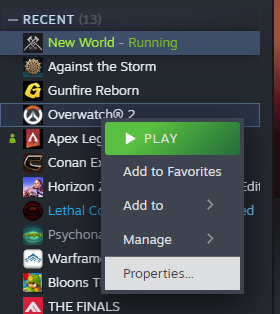
Go to your steam library, right click on Overwatch and select “Properties…”
After launching properties, you will then add this line to the launch options.
–lobbyMap=<Background ID>
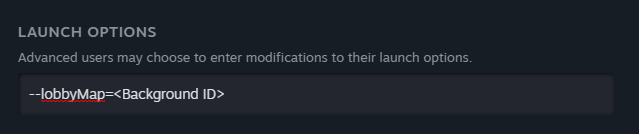
Skyborik shows all the background ID’s in this guide, so check it out here!
For Battle.net users, it’s pretty similar! Here’s how you can do it!
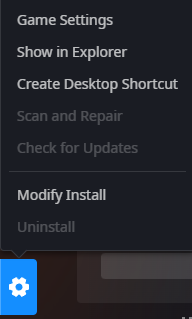
Go to your game page, and click on the cog wheel!
In Game Settings, enter this in the command line arguments!
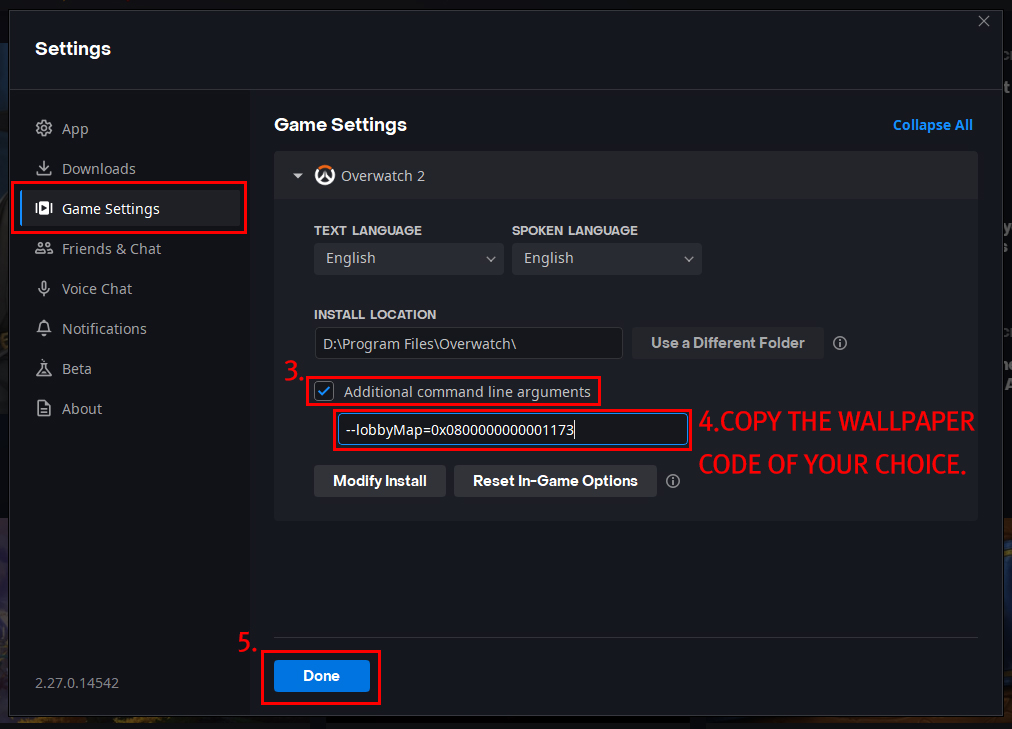
So what’re you waiting for? Go crazy and get your fave Wallpaper on!


Leave a Comment